Business Suite

tack

Website widgets for your business

Tack it onto your website.

Tack a pay button, your FAQs, your hours and more onto your own website. Pick a widget, copy one line, paste it into your site. Your customers can pay, call, find your hours and get answers without leaving your page.

Free to start with 1 live widget on 1 website and 1,000 views a month. Paid plans are from $24 a month, and Basic is included in Small Business MBA Live.

What Tack does

Tack puts small, useful things on your own website. You fill a widget in, publish it, and paste one line of code into your site. Your visitors use it without leaving your page. It opens right inside your Small Business MBA portal.

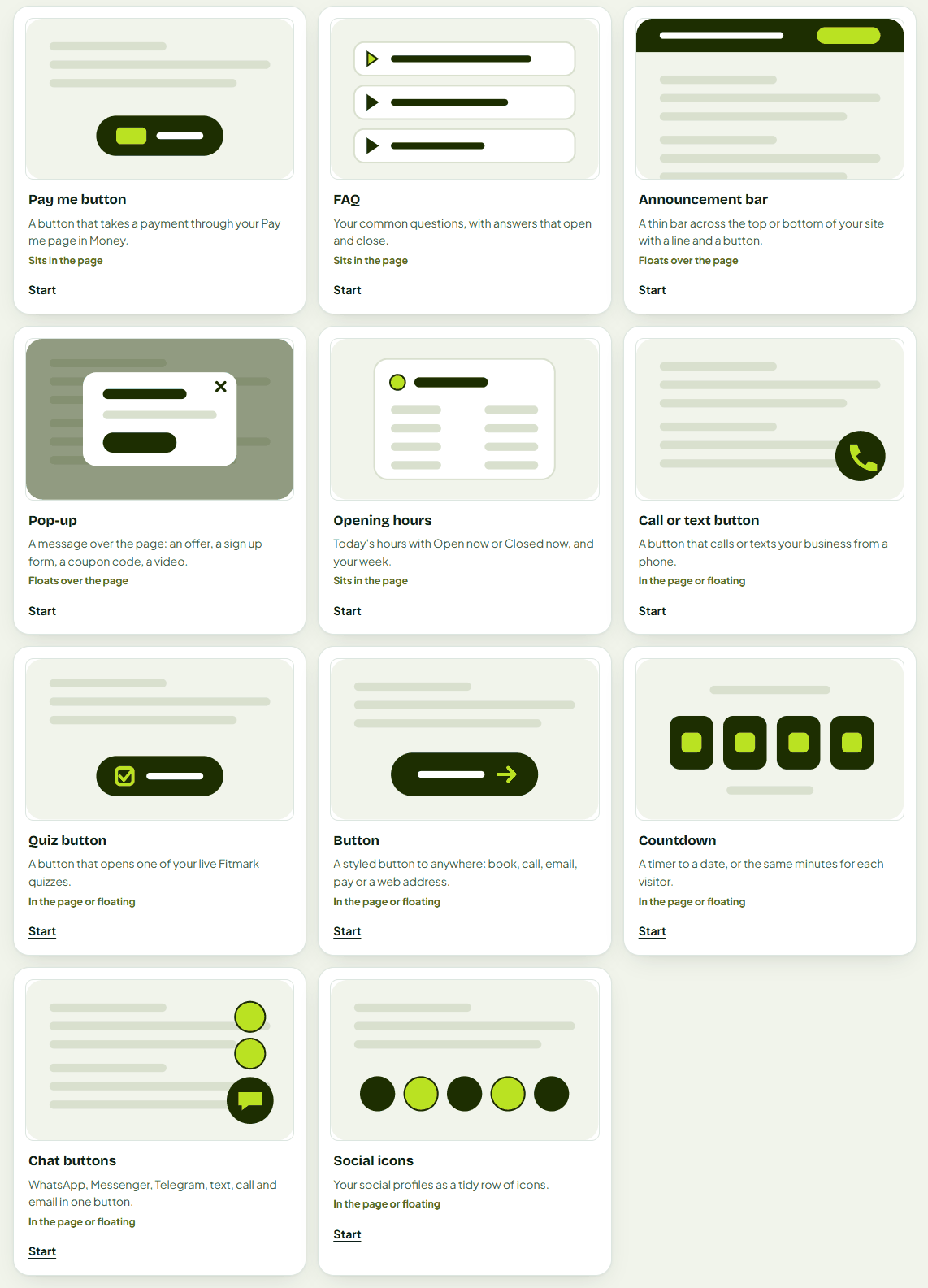
Pay me button

A button that takes a payment through your Pay me page in Money.

FAQ

Your common questions, with answers that open and close.

Announcement bar

A thin bar across the top or bottom of your site with a line and a button.

Pop-up

A message over the page: an offer, a sign up form, a coupon code, a video.

Opening hours

Today's hours with Open now or Closed now, and your week.

Call or text button

A button that calls or texts your business from a phone.

Quiz button

A button that opens one of your live Fitmark quizzes.

Button

A styled button to anywhere: book, call, email, pay or a web address.

Countdown

A timer to a date, or the same minutes for each visitor.

Chat buttons

WhatsApp, Messenger, Telegram, text, call and email in one button.

Social icons

Your social profiles as a tidy row of icons.

Every kind, on every plan

All 11 kinds are on the free plan too. Plans differ in how many widgets are live at once, how many websites and how many views a month, never in which kinds you can use.

The Pick a widget screen in Tack, with a card for each of the 11 kinds of widget.
Pick a widget, inside Tack. Each kind starts from a sample you can change word for word, or from blank. The business shown is a sample.

Five ways to put it to work

Pick a way, copy the code, and paste it into your site. You only paste it once: later changes show by themselves when you publish.

On your site

One line of code puts the real widget in your page, in your site's own font.

A button

A button that opens the widget's own page: as a pop-up on the same page, in a new tab, or in the same window.

A link

A link for an email, a text or a social profile. It opens the same three ways.

A card

The widget's page in a frame inside your page. It needs no script.

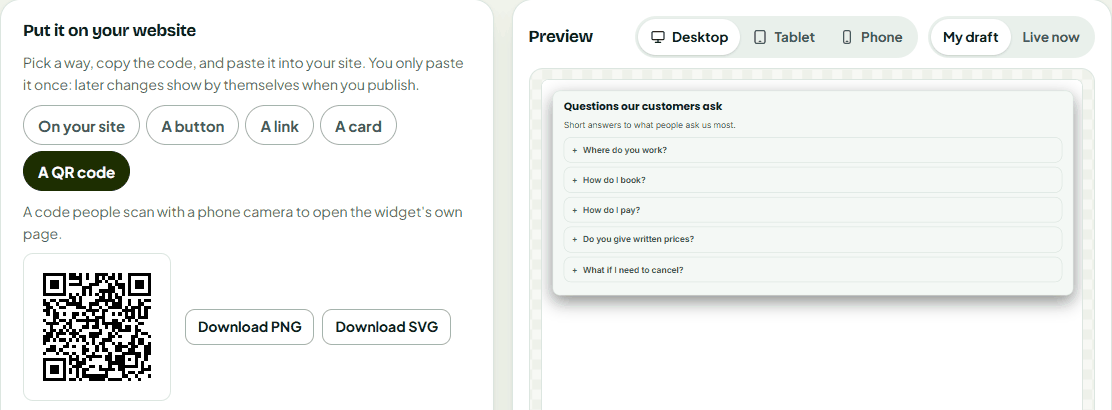
A QR code

Print it on a card, a flyer or your door. It opens the widget's page on the phone that scans it.

The Share tab in Tack: On your site, A button, A link, A card and A QR code, with the QR code and a live preview of a FAQ.
The Share tab. Tack has numbered steps for Wix, Squarespace, Shopify, WordPress, GoDaddy, Webflow and a site you coded yourself, and it checks that your widget is showing.

Your brand, your numbers, your team

Brand kit

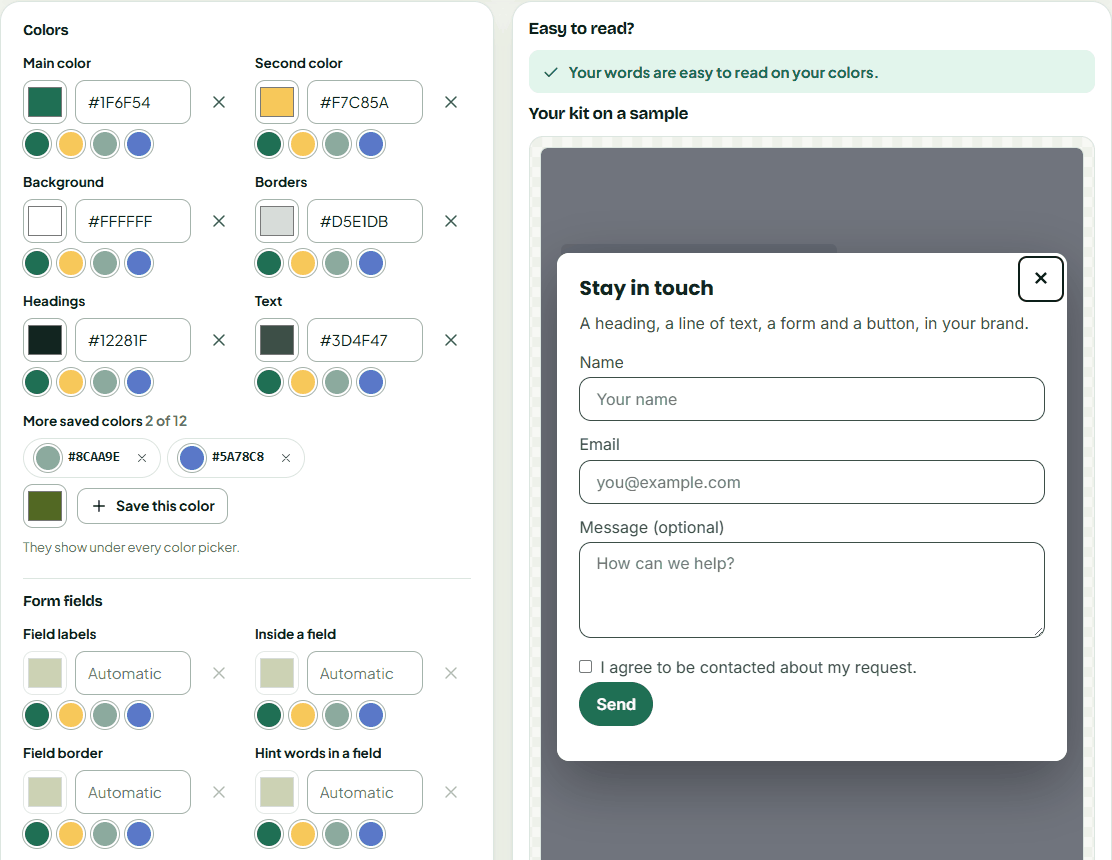
Your colors, fonts, logo and social links, set once. Every widget starts from them, and any widget can still wear its own look. Tack tells you when a pair of colors is hard to read.

The Brand kit screen in Tack: color pickers on the left and a sample pop-up drawn in the brand on the right.

Numbers

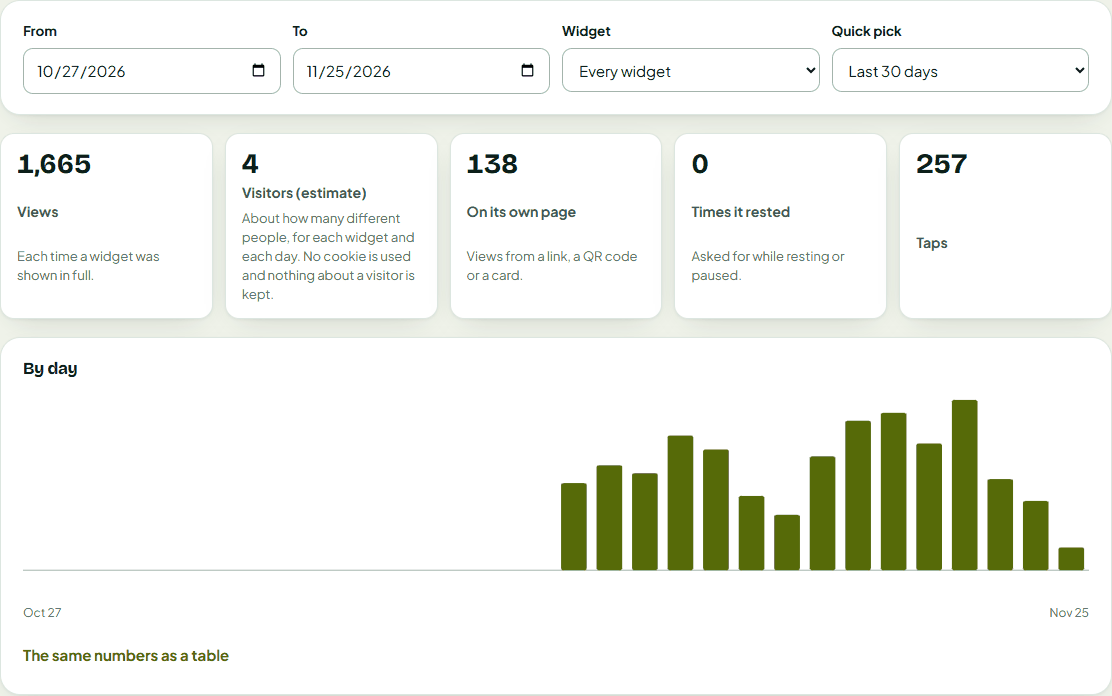
Views by day and by widget, the taps on each widget (a call, a text, a click, an answer opened, a code copied, a form sent), the websites your widgets showed on, and this month's use against your plan. Export them any time.

The Numbers screen in Tack: views, an estimate of visitors, taps and a chart of views by day.

Forms and coupon codes

A pop-up can carry a sign up form and a coupon code, and a bar can carry a code. Every entry is kept in Tack on every plan. You can give each visitor their own code from your list.

Team

Every plan has your own seat and a seat for your web person. Business has 3 seats, for a team. Everyone works in your widgets with their own sign in. You stay the owner.

English and Spanish

The words a widget shows your visitors come in English and Spanish, and you can retype any of them.

Every plan, plainly

Tack is free to start, and the free plan is not a trial: it does not end. Every kind of widget, every way to share and every number is on every plan, and so is every look control but custom CSS.

Free

Try every kind of widget on your own site.

$0 a month$0 a year

No card needed.

Start Tack free
  • 1 widget live at once
  • 1 website
  • 1,000 views a month

What you get:

  • All 11 kinds of widget
  • Five ways to share, with a QR code
  • Brand kit, numbers and form entries
  • 10 MB of file storage
  • The Powered by line on your widgets
  • A seat for your web person

Basic

Included in Live

One site, with your name on it and not ours.

$24 a month$240 a year

Included in Small Business MBA Live.

Get it with Live
  • 15 widgets live at once
  • 1 website
  • 100,000 views a month

Everything in Free, and:

  • The Powered by line removed
  • 300 form entries emailed to you a month
  • 500 MB of file storage

Pro

More sites, your own CSS and entries by email.

$54 a month$540 a year

Live members: $44 a monthLive members: $440 a year

Opens soon
  • 50 widgets live at once
  • 3 websites
  • 500,000 views a month

Everything in Basic, and:

  • Custom CSS
  • 1,000 form entries emailed to you a month
  • 2,048 MB of file storage

Business

Many sites, with seats for your team.

$89 a month$890 a year

Live members: $79 a monthLive members: $840 a year

Opens soon
  • 200 widgets live at once
  • 10 websites
  • 2,000,000 views a month

Everything in Pro, and:

  • 3 team seats
  • 3,000 form entries emailed to you a month
  • 10,240 MB of file storage

What you can start today: the Free plan, and Basic with Small Business MBA Live. The paid plans are not on sale yet. They open inside Tack, under Settings.

Compare every limit

What each plan includes
What you getFreeBasicIncluded in Small Business MBA LiveProBusiness
Price by the monthFree$24 a month$54 a month$89 a month
Price by the yearFree$240 a year$540 a year$890 a year
Small Business MBA Live members, by the monthNot offeredIncluded$44 a month$79 a month
Small Business MBA Live members, by the yearNot offeredIncluded$440 a year$840 a year
Widgets live at once11550200
Websites11310
Views a month1,000100,000500,0002,000,000
The Powered by line on your widgetsShownRemovedRemovedRemoved
Team seats, yours included2223
Form entries emailed to you a monthNot included3001,0003,000
Custom CSSNoNoYesYes
File storage10 MB500 MB2,048 MB10,240 MB
Files added a month205002,0005,000
Files shown or downloaded a month1,000500,0002,000,0006,000,000

Past your views for the month

Your widgets rest until the first day of the next month. They show nothing on your site, and your website itself is untouched. Tack tells you at 80% and 100% of the month's views. Never stopped by the limit: the builder, your numbers, your export, every Pay me payment, and call and text links.

The Powered by line

On the free plan, each widget and each widget page carries one small line: Powered by the Small Business MBA. It is how the free plan is paid for. Any paid plan removes it, and so does Small Business MBA Live.

Small Business MBA Live

Live includes Tack at Basic: 15 live widgets, 100,000 views a month and no Powered by line. Live members get Pro and Business for $10 a month less: $44 and $79 a month, or $440 and $840 a year. See Small Business MBA Live

Refunds

Cancel within 14 days of the first payment of a yearly plan and we refund that payment in full. Monthly payments are not refunded for part of a month. Nothing is deleted when a plan ends: your widgets stay yours on the free plan.

Basic emails up to 300 form entries a month to you, Pro up to 1,000 and Business up to 3,000. A view is one widget shown to one visitor on one page load, or one opening of a widget's own page. A FAQ that shows other FAQs of yours counts one view for itself and one for each FAQ it shows. Months follow Pacific time. Tack has its own terms, and you agree to them only when you first open Tack: read the Tack Software Terms.

No cookies on your visitors

Counted without cookies

Tack sets no cookies. Our server counts each time it serves a widget and keeps totals by day and by widget. It keeps nothing about who the visitor was. The only details Tack keeps about a visitor are the ones they type into a form you add.

Sealed inside your page

A widget is drawn inside its own sealed part of the page: its styles stay in, your site's stay out. Script is never run from what you type.

Built for everyone

Every widget works with a keyboard and a screen reader. A visitor whose device asks for less motion gets no animation.

How to start

  1. Join the free Small Business MBA

    It takes a minute and needs no card.

  2. Take the short assessment

    About four minutes, all taps. Then Tack opens.

  3. Make your first widget

    Pick a kind, change the sample to your words, publish it, and paste one line into your site.

Already a member? The same button takes you straight to Tack.

Questions

What is Tack?

Tack puts small, useful things on your own website: a pay button, your questions and answers, an announcement bar, a pop-up, your opening hours, a call or text button, a quiz button, a button, a countdown, chat buttons and social icons. You fill a widget in, publish it, and paste one line of code into your site. Your visitors use it without leaving your page.

Do I need a website to use it?

No. Every widget also has a page of its own, with a link and a QR code. Put the link in an email, a text or a social profile, and print the QR code on a sign or a card.

Do I need to know how to code?

No. You copy one line and paste it where your website builder takes code. Tack has numbered steps for Wix, Squarespace, Shopify, WordPress, GoDaddy, Webflow and a site you coded yourself. If someone else looks after your site, Tack writes them an email with everything they need.

Which widgets are on the free plan?

All 11 kinds. Plans differ in how many widgets are live at once, how many websites and how many views a month, never in which kinds you can use.

What happens when I use all my views?

Your widgets rest until the first day of the next month. Resting means they do not show. Your website itself is untouched: nothing breaks, nothing looks empty, and no error shows. Tack tells you when your widgets have used 80% and 100% of the month's views. Payments are never held back by a limit in Tack.

Is Tack included in Small Business MBA Live?

Small Business MBA Live includes Tack at Basic: 15 live widgets, 100,000 views a month and no Powered by line, with every other Live benefit. Live members get Pro and Business for $10 a month less: Pro is $44 a month and Business is $79 a month. Paid by the year, a Live member's price is $440 for Pro and $840 for Business.

Can I get a refund?

On a yearly plan, yes: cancel within 14 days of its first payment and that payment is refunded in full. Monthly payments are not refunded for part of a month. A monthly plan you cancel stays on to the end of the month you paid for.

Does Tack put cookies on my visitors?

No. It sets no cookies. A pop-up or a bar can remember, in the visitor's own browser, that it was already seen or closed. Tack keeps nothing about who a visitor is, apart from what they type into a form you add.

Is Tack like POWR or Elfsight?

It does the same kind of job: small widgets you paste into your own website with one line of code. This page lists every widget, every limit and every price, so you can compare for yourself.

More answers: the Tack tutorial and the full Tack FAQ.

Start Tack free

Join the free Small Business MBA, take the short assessment, and open Tack.

Start Tack free

Joining takes a minute and needs no card.